Download Voicemod 2.48.0.0 – Phần mềm thay đổi giọng nói khi chat, chơi game online
Download Voicemod 2.48.0.0 – Phần mềm thay đổi giọng nói khi chat, chơi game online

Voicemod là một ứng dụng thay đổi giọng nói miễn phí trên Windows, được ưa chuộng trong các chương trình chat và game như Skype , Discord , Fortnite , Minecraft , CS:GO , PUBG , Valheim , Rocket League , Valorant , Among Us…
Giống Clownfish Voice Changer , Voicemod có khả năng thay đổi âm sắc và định dạng của tín hiệu âm thanh từ microphone, kèm theo các hiệu ứng âm thanh ngộ nghĩnh như giọng em bé, giọng robot… để tạo tiếng nói giả.
Khi trò chuyện với bạn bè hay chơi game online, bạn có thể sử dụng Voice Mod để biến giọng nói của mình thành một giọng khác, mang lại sự thú vị.
Voice Changer – Thay đổi giọng nói là gì?
Voice Changer hay Voice Modulator là thiết bị hoặc phần mềm có khả năng biến đổi âm sắc và hình thức của tín hiệu âm thanh, thường là từ microphone. Các thiết bị chuyên dụng này có thể thay đổi giọng nói trực tuyến, trong thời gian thực hoặc xử lý tệp âm thanh đã thu âm định dạng WAV hoặc MP3. Chúng thường được dùng để thêm hiệu ứng âm thanh và che giấu giọng nói thực.
Voicemod là phần mềm biến đổi giọng nói chuyên nghiệp, tạo niềm vui khi troll bạn bè hoặc khi chơi game trực tuyến, mang đến trải nghiệm giải trí đặc sắc.
Voice Mod là phần mềm an toàn, không gây hại, đặc biệt cho trẻ em. Sử dụng cho mục đích giải trí với các hiệu ứng hài hước, phù hợp mọi lứa tuổi. Tải Voicemod ngay hôm nay.
Voice Mod – ứng dụng thay đổi giọng nói hàng đầu
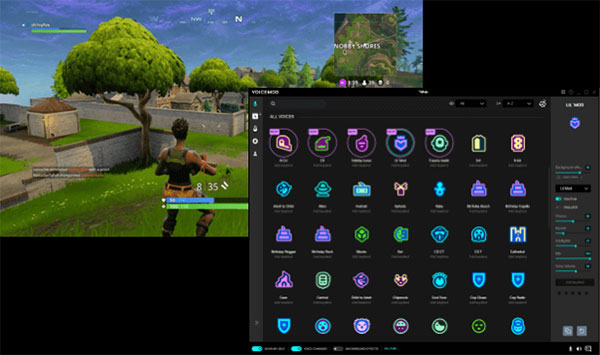
Thưởng thức công nghệ biến đổi giọng nói hàng đầu dành cho game thủ và streamer với Voicemod. Chương trình này cho phép bạn sáng tạo và phát huy trí tưởng tượng khi thay đổi giọng nói của mình trong thời gian thực với nhiều bộ lọc độc đáo.
Không chỉ có những giọng nói độc lạ, Voicemod còn cung cấp các filter hoành tráng. Tận dụng những lợi thế này để cải thiện các phiên chơi game cùng bạn bè, tạo nội dung giải trí hấp dẫn hoặc nhập vai nhiều nhân vật khác nhau.
Phiên bản mới nhất của Voicemod còn hỗ trợ phím tắt, giúp truy cập giọng nói yêu thích nhanh chóng mà không cần tìm kiếm lâu. Các tùy chọn là vô tận và chỉ mất chưa đầy 5 phút để hoàn thành. Hóa thân vào nhiều vai khác nhau và tạo niềm vui cho cộng đồng với phần mềm miễn phí Voicemod!
Sử dụng công cụ thay đổi giọng nói có hợp pháp không?
Những công cụ như Voicemod thay đổi âm sắc và định dạng giọng nói bằng hiệu ứng, chúng hợp pháp và có thể áp dụng trong nhiều tình huống như troll bạn bè, làm video vui nhộn… Tuy nhiên, sử dụng cho mục đích phạm tội hoặc có hại là bất hợp pháp, như đe dọa hoặc bắt nạt trên mạng xã hội, tống tiền… Tùy vào mục đích sử dụng, phần mềm có thể là hợp pháp hoặc bất hợp pháp.

Tóm lại, trong hầu hết các trường hợp sử dụng bình thường của công cụ thay đổi giọng nói (mang tính giải trí), chúng vô hại và hợp pháp. Ngược lại, nếu sử dụng cho mục đích xấu, sẽ bị xử phạt theo quy định pháp luật.
Quy trình hoạt động của Voicemod
- Phần mềm chat hoặc game nhận tín hiệu âm thanh từ mic.
- Khi nhận thấy tín hiệu âm thanh, Voicemod xử lý trong thời gian thực với nhiều hiệu ứng khác nhau như Panning, Delay, Echo, Reverb, Chorus, Distortion, EQ, Filters, Vocoder, Auto-Tune, Compression hay Pitchshifter.
- Sau khi xử lý, tín hiệu âm thanh được gửi đến thiết bị đầu ra như loa, chương trình ghi âm hoặc tai nghe.
Công nghệ AI Voice dùng trong Voicemod
Text-to-Speech
Công nghệ chuyển văn bản thành giọng nói, rất chính xác, là công cụ hữu ích cho người khiếm thị, giúp phá vỡ rào cản ngôn ngữ cho người khó đọc hiểu.
Công cụ Text to Song trong Voice mod cho phép người dùng nhập văn bản, chọn nhạc, ca sĩ AI và biến thành một bài hát.
Nhận diện giọng nói
Một trong những công nghệ AI Voice đột phá gần đây là khả năng nhận diện lời nói. AI chuyển đổi giọng nói thành văn bản rất chính xác, lý tưởng cho giao tiếp qua Email, tin nhắn hay xử lý văn bản dài.
Tìm kiếm giọng nói
Tối ưu hóa tìm kiếm bằng giọng nói rộng rãi trong SEO, áp dụng cho nội dung web với kết quả tìm kiếm đa dạng.
Biên dịch AI Voice
Thông qua AI, Voice Translation dịch ngôn ngữ nói từ ngôn ngữ này sang ngôn ngữ khác trong thời gian thực. Công nghệ này giúp phá vỡ rào cản ngôn ngữ, hỗ trợ giao tiếp dễ dàng giữa người dùng các quốc gia.
Real-time Voice Changer
Transform the way we communicate online with Voicemod . This technology is widely used among gamers, content creators, and on social media.
Update to the latest Voicemod software
Voicemod – Meme Generator:
Combine GIFs, sounds, and captions to create unique Memes in Voice Mod and share them with the world.
GIFs and Meme Sounds are among the most used resources on the Internet. Users can merge them to create new content in just seconds. Voicemod Meme Generator is a fun tool to prank friends and others, featuring amazingly vivid sound GIFs.

Explore the vast collection of GIFs and sounds from the Voicemod user community to create groundbreaking sound GIFs and widely use them on Discord, Messenger, WhatsApp, or any communication channel.
The combination of hundreds of thousands of sound Memes and millions of GIFs will test your creativity and imagination. Here’s how:
- Search for animations among millions of available GIFs.
- Find the suitable Meme sound for the image.
- Add funny and unique captions.
- Create Meme and share on chat channels, social networks…
Voicemod (02/2021):
Voicemod unveils a brand new interface and significant changes on sites, apps, and related social channels. Explore the ultra-realistic voice collection that meets all your entertainment, gaming, and chatting needs.
A new era of sound identity
In collaboration with DesignStudio, Voice Mod becomes the leading voice changing software on PC thanks to its excellent voice recognition capabilities. Trusted by millions, the new Voicemod adds “eclectic” voice filters and highly customizable soundboards, offering diverse and creative online experiences.
The new Voicemod aims at a world where people can create their own voice identity. Sound is a great way to express emotions and convey personal messages, connecting people and beyond. With new sounds and filters, you can convey emotions truly as you wish.
Benefits of using the genuine Voicemod PRO version
Voicemod PRO delivers significant upgrades, including random voices, mute function, or bad language censor button. These premium tools apply to your live streaming versions.
Voicemod PRO significantly improves sound quality, stability, and powerful editing features. Additionally, the tool integrates with Stream Deck – the best controller for gamers and streamers.
Pre-made presets and new voices
In the latest version of Voicemod Voice Changer, many new features have been added:
- Use the available presets, ready to use or customize as you wish. You can get original, funny, or quirky voices like Poison, Blocks, Out of Range, or Game Over.
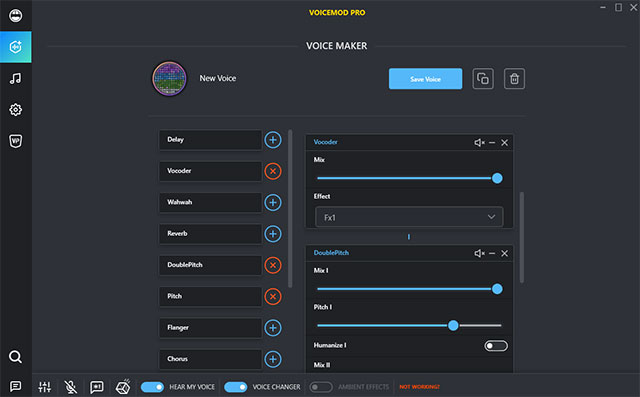
Create your own voice with blended effects
- Thanks to the Voice Maker feature, you can create a new voice with effects on pitch, delay, echo, filter…
Meme Sound Machine
- Explore the soundboard for online games or communication apps. Upload the sound file you want (WAV or MP3 format) and surprise players with a series of unique Meme Sounds.
How to use Voicemod in 6 steps
- Download Voicemod from the download button above and configure the program on your computer by selecting the main microphone as the input device.
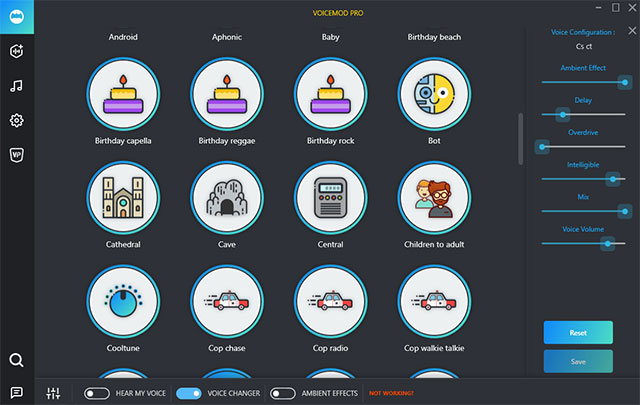
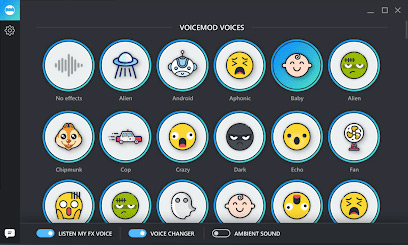
- Select the Voicebox menu to access more than 80 voice filters that Voicemod offers (this number keeps increasing with updates).
- Make sure that the Voice Changer option is enabled at the bottom of the screen.
- Explore the library of available voice effects on Voicemod, choose any effect, and assign it to the shortcut you want.
- Use the Hear Myself button at the bottom of the program window to test the new voice (after having the effect). Operate on the Background Effects button to enable or disable background effects if desired.
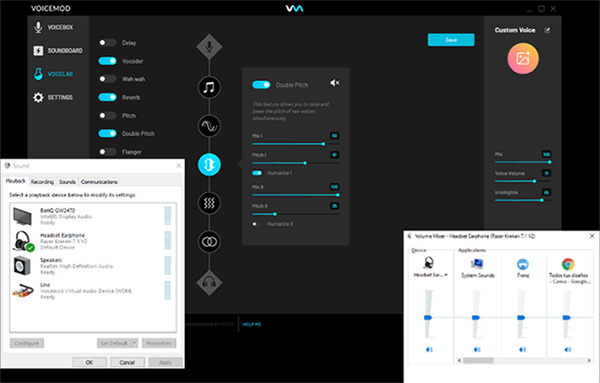
- Ensure that you have selected Microphone (Voicemod Virtual Audio Device) as the input device in the application you want to use the Voicemod voice changing tool.
The new voice will be applied through the microphone signal and the process is completed 100%.
Frequently Asked Questions
Voicemod is free voice-changing software for Windows, widely used in chat and game software like Skype, Discord, Fortnite, Minecraft, CS:GO, PUBG, Valheim, Rocket League, Valorant, Among Us. The software supports changing voice tonality and integrating amusing sound effects to mimic voices.
Voicemod and other voice-changing software are legal when used for entertainment purposes like pranking friends or creating fun content. However, using these tools for illegal purposes like threatening, scamming, or extortion is illegal and violates the law.
Voicemod supports real-time voice change with diverse filters and effects, creating sound memes with GIFs, setting shortcuts for quick access to favorite voices, crafting new voices using Voice Maker, integrating AI Voice technology, and the meme generator application.
Voicemod works by receiving audio signals from a microphone, processing the audio in real-time with various effects like Panning, Delay, Echo, Reverb, Chorus, Distortion, EQ, Vocoder, Auto-Tune, then sending the processed signal to the output device such as a speaker or headphone.
Using Voicemod involves six main steps: download the software and configure the microphone, select voice filters in Voicebox, enable the Voice Changer option, choose voice effects and shortcuts, test the new voice via Hear Myself button, and select Microphone Voicemod Virtual Audio Device as the input device in chat or game applications.
Voicemod applies various AI Voice technologies such as Text-to-Speech (converting text to speech), Text to Song tool (turning text into songs), voice recognition (transcribing speech to text), voice search, real-time speech translation, and real-time voice changing.
Voicemod PRO offers upgrades like random voices, mute functions, bad language censor button, enhanced sound quality, stability, powerful editing functions, and integration with Stream Deck for gamers and streamers.
Voicemod Meme Generator is a tool that allows users to combine GIFs, sounds, and captions to create unique memes, then share on social channels like Discord, Messenger, WhatsApp. Users can search millions of GIFs and meme sounds, adding humorous captions to create creative content.