Download MySQL 8.0.44 – Hệ quản trị cơ sở dữ liệu
Download MySQL 8.0.44 – Hệ quản trị cơ sở dữ liệu

Database Application MySQL Installer 8.0.44 is available for free download from one of the most popular open-source database communities in the world…
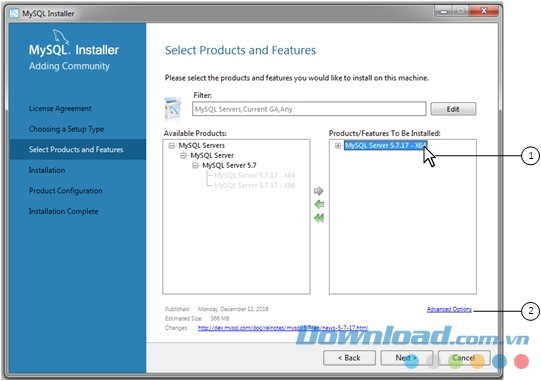
MySQL Installer contains many useful features for system administrators
The program was created from the enthusiastic work of open-source application developers and passionate and dedicated users around the world.
MySQL Installer is a reliable and practical software solution when you need to install multiple MySQL products in the simplest way possible.
Features of MySQL Installer
Select Components to Deploy
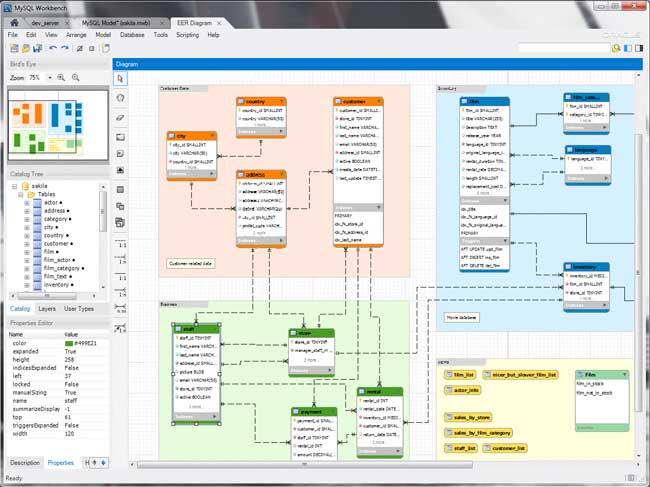
MySQL Installer includes various applications like MySQL Server, MySQL Workbench, MySQL Connectors, MySQL Notifier, MySQL for Excel, and MySQL for Visual Studio. Each comes with samples, examples, and documentation to help you better understand how they work.
MySQL Installer includes easy-to-understand installation and configuration instructions. Users just need to choose the application they want to install on their machine, specify the installation location, and update the system. The software offers five different setup types: Developer Default, Server only, Client only, Full, and Custom.
Automatically Check System Compatibility
The “Custom” option helps you effectively select the products you want to install on the system. The left panel displays all available programs to be installed. The right panel allows users to choose only components they are interested in. Thus, if you expand the entire MySQL Installer connection, you can select the desired programs such as Connector/ODBC, Connector/C++, or Connector/NET.
No matter which way you choose, MySQL Installer checks the whole system and reports any necessary requirements before installing the selected product. After completing the installation of all additional programs, it displays all the products updated or installed according to user selection.
In summary, MySQL Installer is an efficient database management software, especially for developers and system administrators who need to install multiple MySQL products with just a few clicks.
MySQL AI – AutoML and GenAI
MySQL AI provides secure, automated, and integrated machine learning (ML) along with the new generation AI technology. AutoML simplifies ML processes, allowing users to build, train, and interpret ML models without data transfer or extra costs. Concurrently, LLMs within the database, integrated vector storage, or embedding models support GenAI, semantic search, and retrieval augmented generation (RAG) with lower infrastructure costs, data preservation, and simplified operations.
- GenAI: Use LLM in the database to store data and create or summarize content without additional infrastructure costs (GPU).
- Vector Storage: LLM searches documents with high accuracy without data transfer or separation.
- Comprehensive ML Compatibility , saving time in data transfer while supporting tasks like detection, prediction, classification…
- Data Detection and Model Interpretation by AutoML.
- Text to SQL Conversion (NL2SQL): Query the database by natural language. NL2SQL uses LLM to convert a typical query into SQL. Gather metadata to interpret the visual model, creating the perfect SQL statement for the database structure.
HeatWave
Tận dụng tích hợp AI và học máy tự động trong dịch vụ đám mây để trao đổi và phân tích dữ liệu lakehouse. Khả năng cung cấp cái nhìn tổng quan, hỗ trợ triển khai ứng dụng trong đám mây một cách nhanh chóng.
- HeatWave GenAI: Kết hợp AI mà không cần điều chỉnh hay di chuyển dữ liệu, áp dụng cho các mô hình ngôn ngữ lớn LLM trong cơ sở dữ liệu.
- HeatWave MySQL: Cải thiện tốc độ truy vấn MySQL và phân tích thời gian thực các dữ liệu giao dịch.
- HeatWave Lakehouse: Truy vấn dữ liệu dưới nhiều định dạng, kết hợp với dữ liệu giao dịch trong cơ sở dữ liệu.
- HeatWave AutoML: Tự động hoá quy trình xây dựng và phân tích mô hình ML, không cần di chuyển dữ liệu hay phát sinh chi phí thêm.
Chức năng của MySQL Enterprise
- Phân vùng dữ liệu để cải thiện quá trình xử lý và quản lý cho cơ sở dữ liệu lớn.
- Tích hợp chức năng Row-based/Hybrid Replication tăng cường bảo mật.
- Scheduler cho phép thực hiện nhiều công việc khác nhau.
- Hỗ trợ XPath
- Dynamic General/Slow Query Log
- Công cụ kiểm tra hiệu suất và tải (mysqlslap)
Cải thiện chức năng: Full Text Search (tăng tốc và đa dạng mẫu), Archive engine (khả năng nén tốt hơn), nhận diện vấn đề bảo mật và nhận dạng SQL, hỗ trợ thư viện nhúng MySQL (libmysqld), bổ sung đối tượng INFORMATION_SCHEMA, hỗ trợ nhập và xuất dữ liệu nhanh chóng, cải thiện giao dịch ACID Transactions, cung cấp truy cập nhanh đến dữ liệu metadata bằng Information Schema, tối ưu hóa chức năng Pluggable Storage Engine Architecture, bổ sung Archive Storage Engine.
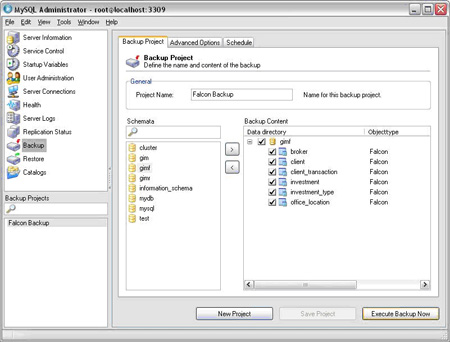
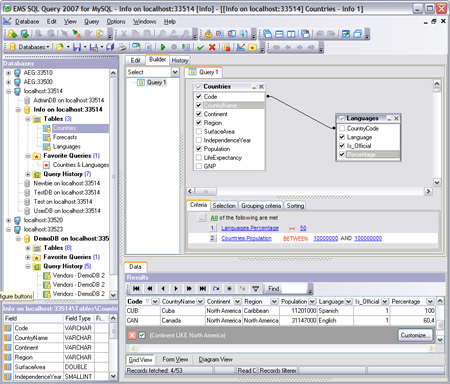
.jpg "Hệ quản trị cơ sở dữ liệu 3")
Giao diện chính của chương trình
Điểm mới ở MySQL 8 – Tăng tốc độ hoạt động nhanh hơn gấp 2 lần
MySQL 8 cải thiện hiệu suất, tăng cường bảo mật, lập trình cho web, mobile và ứng dụng dựa trên đám mây.
Tính năng mới
- Document Store để phát triển ứng dụng tài liệu SQL và NoSQL trên một cơ sở dữ liệu duy nhất.
- Transactional Data Dictionary được triển khai dưới dạng tập hợp các bảng SQL trên vùng bảng InnoDB.
- SQL Roles cấp quyền và quản lý quyền cho nhóm người dùng, giảm tải công việc bảo mật.
- Default to utf8mb4 character set tăng cường hỗ trợ ứng dụng mobile và bộ ký tự quốc tế.
- Bổ sung Common Table Expressions cho các truy vấn WITH trong MySQL 8.0.
- Window Functions để đơn giản hóa mã và hỗ trợ lập trình viên hiệu quả hơn.
- Invisible Indexes để quản lý các nâng cấp phần mềm và thay đổi cơ sở dữ liệu cho ứng dụng 24×7.
- Descending Indexes giảm tải việc phân loại và cải thiện hiệu suất.
Cải tiến
- Hỗ trợ JSON với nhiều bổ trợ phong phú bao gồm hàm JSON_TABLE() trả dữ liệu dưới dạng bảng liên quan.
- Nhanh hơn gấp 2 lần nhờ công cụ benchmark mới, lên tới 1.8 triệu truy vấn/giây.
- OpenSSL là thư viện TLS/SSL mặc định.
- Sơ đồ hiệu suất và truy vấn nhanh hơn tới 30 lần.
- Hiển thị thông tin truy vấn nhanh hơn tới 100 lần.
- Cải tiến GIS để hỗ trợ hệ thống tham chiếu không gian.
- Dễ sử dụng: 3 phút để cài đặt và cấu hình.
- Phân vùng để cải thiện hiệu suất và quản lý môi trường database.
- Giao dịch ACID để xây dựng các ứng dụng tin cậy và an toàn.
Lưu ý: MySQL 8.0 là phiên bản cuối cùng đi kèm với MySQL Installer . Từ MySQL 8.1, cài đặt thông qua file .msi hoặc giải nén file Zip. MySQL Server 8.1 trở lên tích hợp công cụ MySQL Configurator để cấu hình MySQL Server.
Câu hỏi thường gặp
MySQL Installer là chương trình miễn phí giúp cài đặt nhiều sản phẩm của MySQL dễ dàng, bao gồm MySQL Server, Workbench, Connectors, Notifier, MySQL cho Excel và Visual Studio. Hỗ trợ chọn lựa thành phần và tự động kiểm tra tương thích hệ thống.
MySQL Installer hỗ trợ 5 loại thiết lập: Phát triển (Default Developer), Chỉ máy chủ (Server only), Chỉ máy khách (Client only), Toàn bộ (Full), và Tùy biến (Custom).
MySQL Installer kiểm tra toàn bộ hệ thống và báo cáo các yêu cầu cần thiết trước khi tiến hành cài đặt, đảm bảo quá trình diễn ra thành công.
HeatWave là dịch vụ đám mây tích hợp AI và học máy để phân tích dữ liệu nhanh. Bao gồm HeatWave GenAI, MySQL, Lakehouse và AutoML.
MySQL Enterprise bao gồm phân vùng dữ liệu cải thiện hiệu suất, bảo mật, quản lý công việc, hỗ trợ XPath, log truy vấn, và công cụ kiểm tra hiệu suất.
MySQL 8 tăng gấp đôi tốc độ, bổ sung Document Store, Transactional Data Dictionary, SQL Roles, mặc định utf8mb4, Common Table Expressions, Window Functions, Invisible Indexes, Descending Indexes và cải thiện JSON.
Kể từ MySQL 8.1, sử dụng file .msi hoặc giải nén Zip. Tích hợp MySQL Configurator để cấu hình MySQL Server.
MySQL Installer hỗ trợ quản trị viên cài đặt nhanh chóng nhiều sản phẩm, lựa chọn thành phần, kiểm tra tương thích và quản lý cập nhật sản phẩm hiệu quả.
MySQL 8 hỗ trợ bảo mật, lập trình web/mobile với utf8mb4, JSON cải tiến, SQL Roles, Common Table Expressions, Window Functions và cải thiện hiệu suất truy vấn.
MySQL 8 sử dụng bộ công cụ benchmark mới, tăng tốc độ truy vấn lên tới 1.8 triệu truy vấn/giây, truy vấn nhanh hơn 30-100 lần, cải tiến GIS và các tính năng khác.