Download Firefox Tiếng Việt – Mozilla Firefox 137

Download Firefox Tiếng Việt – Mozilla Firefox 137

Mozilla Firefox 137 là một trình duyệt web nhanh, đầy đủ chức năng. Firefox có tính năng chặn Pop-up, duyệt Tab, tìm kiếm Google tích hợp, quản lý quyền riêng tư dễ dàng, cửa sổ trình duyệt gọn gàng giúp bạn duyệt nhiều trang hơn các trình duyệt khác và những tính năng hữu ích cho việc lướt web. Phiên bản Mozilla Firefox tiếng Việt giúp bạn lướt web mà không gặp vấn đề về ngôn ngữ.
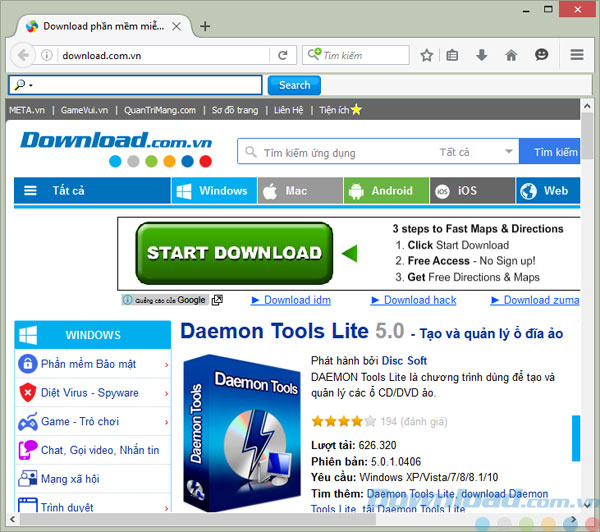
Giao diện của Mozilla Firefox tiếng Việt phiên bản mới nhất
Bạn có thể tham khảo bài giới thiệu về Mozilla Firefox để tìm hiểu thêm các tính năng của trình duyệt web này.
Tính năng mới của Mozilla Firefox tiếng Việt
Tính năng mới
- Trình xử lý đồ họa riêng cho từng tab được gọi là Project Quantum , giúp tận dụng phần cứng tối đa trên máy tính. Quantum Compositor chạy trên GPU thay vì CPU, loại bỏ tình trạng treo hay đơ tab. Người dùng Windows 7, 8, và 10 trên máy tính có card đồ họa Intel, Nvidia, hoặc AMD sẽ nhận thấy sự khác biệt.
- Có thêm 2 theme mới: Dark và Light lấy cảm hứng từ phiên bản phát triển. Theme này áp dụng cho chế độ duyệt web ẩn danh.
- Chế độ Reader Mode hiển thị thời gian đọc ước tính cho trang.
Một số thay đổi
- Tương thích tốt với Windows 10 Creator mới phát hành gần đây. Phiên bản này cải thiện để giảm tình trạng bị crash trên Windows 10 và sửa các lỗi bảo mật cho người dùng.
- Ngừng hỗ trợ Windows XP và Windows Vista. Người dùng Windows XP và Vista sẽ tiếp tục nhận cập nhật bảo mật trên Firefox ESR 52.
Sửa lỗi:
- Các URL với tên miền quốc tế (IDN) ở định dạng Unicode giờ đây được chuyển hướng đúng
- Sửa một số lỗi bảo mật
Developer Features:
- Ability to filter output snapshots in memory tool
- Adjust animations by changing playback speed
- DOMContentLoaded and load events shown in network monitor timeline
- Added negative URL filters for network monitoring
- Support for comparing snapshots added to memory tool
- Search tool now shows results from all content on the website, including subframes
- Effect properties and frames list are not shown when clicking an animation in the animation tool timeline
HTML5 Support:
- Supports Push API, part of Progressive Web Applications
- Supports transferring Content Security Policy (CSP) via meta tag
- ES6 Classes
Unresolved Issues:
- Onscreen keyboard support temporarily disabled on Windows 8 and 8.1
- Trusteer Rapport occasionally affects Firefox stability
After installation, you will see the familiar interface of Mozilla Firefox, only options, features, and menus are displayed in Vietnamese. Below are some images of Mozilla Firefox in Vietnamese:
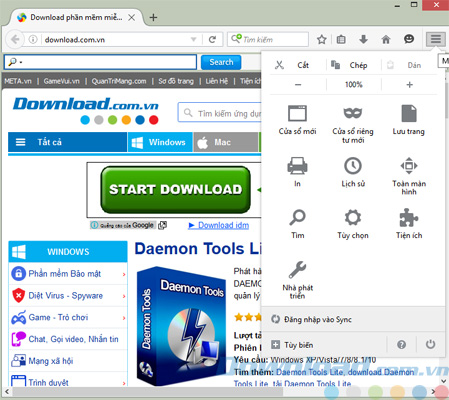
Internet browser menu in Mozilla Firefox Vietnamese
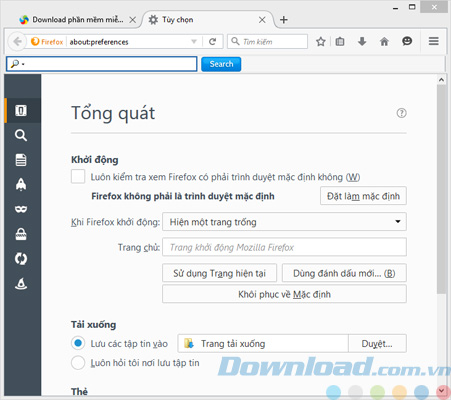
Free Mozilla Firefox Vietnamese browser options
If you enjoy the Mozilla Firefox web browser and want to experience it in Vietnamese, download Mozilla Firefox in Vietnamese and install it on your computer.
Frequently Asked Questions
Mozilla Firefox 137 is a fast web browser with features like Pop-up blocking, Tab browsing, integration with Google search, simple privacy management, streamlined browser windows, and more for online use.
New features include a separate graphics handler for each tab (Project Quantum), two new themes Dark and Light for incognito mode, estimated reading time in Reader Mode, and performance improvements on newer Windows operating systems.
Mozilla Firefox 137 is compatible with Windows 10 Creator, Windows 7, 8, and 10 with Intel, Nvidia, or AMD graphics cards. This version no longer supports Windows XP and Windows Vista.
Fixed correct redirection for international domain (IDN) URLs in Unicode format and several other security bugs.
Includes the ability to filter output snapshots, adjust animations, display events in network monitor timeline, add negative URL filters, support for comparing snapshots in memory tool, and search tool showing results from all website content.
Supports Push API, transferring Content Security Policy (CSP) via meta tags, and ES6 Classes.
Onscreen keyboard support temporarily disabled on Windows 8 and 8.1, and Trusteer Rapport occasionally affects browser stability.
You can download the Vietnamese version of Mozilla Firefox and install it on your computer to experience the interface, options, and features in Vietnamese.