Download TeamViewer 15.69.5 – Kết nối máy tính, truy cập và hỗ trợ từ xa

Download TeamViewer 15.69.5 – Kết nối máy tính, truy cập và hỗ trợ từ xa

TeamViewer là phần mềm điều khiển máy tính từ xa rất tiện lợi và nhanh chóng, có thể kết nối tới bất kỳ máy tính hay máy chủ nào trên thế giới chỉ trong vài giây.
Do sự tiện lợi của nó mà TeamViewer đã chiếm được cảm tình của nhiều người dùng. Tải TeamViewer 15 mới nhất với nhiều tính năng bổ sung hơn so với bản TeamViewer 14.
Tải TeamViewer 15 miễn phí
TeamViewer là giải pháp hỗ trợ điều khiển và truy cập từ xa toàn diện, hoạt động trên mọi desktop và nền tảng di động, bao gồm Windows, macOS, Android và iOS. TeamViewer cho phép bạn điều khiển máy tính hay thiết bị di động ở bất cứ đâu trên thế giới và sử dụng chúng như thể bạn đang ngồi trước nó. Ngoài ra, bạn có thể kết nối từ xa tới các máy chủ, máy tính cấp thương mại và thiết bị IoT từ bất cứ nơi nào, bất cứ lúc nào qua mạng lưới truy cập từ xa toàn cầu an toàn của TeamViewer.
Trải nghiệm hiệu suất chưa từng thấy cùng TeamViewer mới nhất
Tiêu chuẩn chất lượng mới
- Chất lượng tốt hơn cho băng thông thấp: Để bạn có thể kết nối Team Viewer ở bất cứ nơi đâu.
- Cơ sở hạ tầng server hợp lý: Để tăng tính ổn định và thời gian hoạt động.
- Cải thiện chất lượng kết nối: Cung cấp tốc độ kết nối toàn cầu tốt hơn.
Hiệu suất vượt trội
- TeamViewer Pilot: Giải quyết các vấn đề ngoài màn hình bằng thực tế tăng cường.
- Tùy chỉnh thông tin thiết bị: Để bạn nắm tất cả thông tin liên quan trong lòng bàn tay.
- Nhóm thiết bị nâng cao: Để sắp xếp dễ dàng hơn và tham chiếu nhanh.
- Thực thi lệnh bằng một cú nhấn: Tiến hành các quá trình lặp lại chỉ với một lần nhấn.
- Tăng cường khả năng truy cập hỗ trợ khách hàng: Cung cấp dịch vụ hiệu quả hơn nhằm tăng sự hài lòng của khách hàng.
Tính khả dụng tốt hơn
- Dark Mode: Tăng sự tập trung trong khi giảm mỏi mắt.
- Thiết kế mới: Tận hưởng trải nghiệm Team Viewer rõ ràng, hiệu quả hơn.
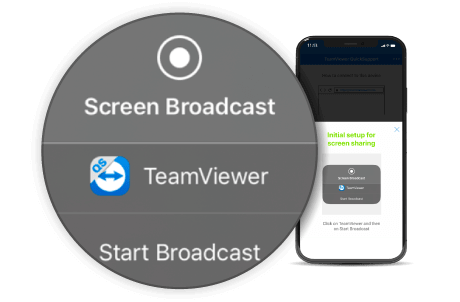
- Quy trình chia sẻ màn hình iOS mới: Giải pháp hàng đầu cho hỗ trợ iOS từ xa giờ tốt hơn trước.
Ưu tiên bảo mật
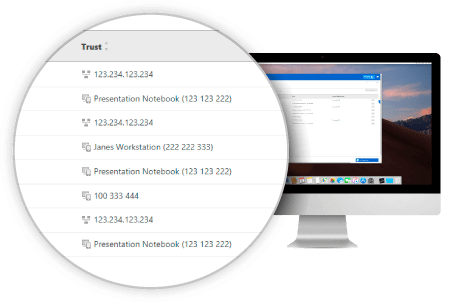
- Quản lý thiết bị đáng tin cậy: Nhiều tùy chọn quản lý hơn cho bảo vệ tối ưu.
- Xuất xứ ở Đức: Niềm tin dựa trên các tiêu chuẩn an toàn cao nhất.
- Tuân thủ GDPR
Trải nghiệm giải pháp thực tế tăng cường mới, độc quyền ở TeamViewer
TeamViewer Pilot
TeamViewer giúp quản trị CNTT giải quyết thách thức hàng ngày

Tốc độ rất cần thiết với quản trị công nghệ thông tin, kể cả trong nhiệm vụ hàng ngày và trường hợp khẩn cấp. Các tính năng tiết kiệm thời gian mới cho phép quản trị viên:
- Thêm tới 25 thông tin vào các trường tùy chỉnh trên thiết bị và nhóm chúng lại để quản lý và xử lý chúng tốt hơn.
- Tiến hành cập nhật nhanh hơn gấp 2 lần bằng cách lưu tiến trình và chỉ với một lần nhấn, chạy chúng trong suốt phiên làm việc.
Đội hỗ trợ CNTT có thể sử dụng TeamViewer để trợ giúp đối tác tức thì

Trong vai trò người hỗ trợ kỹ thuật, sự hài lòng của khách hàng luôn là ưu tiên hàng đầu. Với các tính năng thực tế tăng cường và ưu tiên khách hàng khác, bạn có thể nhanh chóng giải quyết những yêu cầu trợ giúp từ khách hàng.
- Giải pháp dịch vụ servicecamp được tích hợp vào module QuickSupport giúp khách hàng nhận hỗ trợ nhanh hơn và giao tiếp dễ dàng trong đội ngũ trợ giúp.
- Hỗ trợ của TeamViewer cho thiết bị di động là độc nhất. Đơn giản hóa quy trình chia sẻ màn hình làm cho nó chạy nhanh và dễ dàng hỗ trợ thiết bị iOS hơn.
TeamViewer dành cho công ty: Ưu tiên bảo mật hàng đầu

TeamViewer understands that security is a top priority for most businesses, and so it is for this software. That’s why TeamViewer 14 is safer:
- Manage trusted devices dashboards and move devices in emergencies with one click.
- Maintain high security standards, meeting Germany’s stringent requirements.
Discover new features in TeamViewer
Premium + Corporate
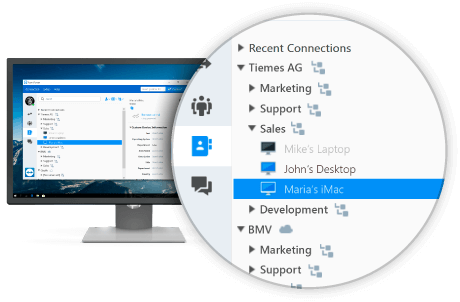
Advanced Device Grouping
Quickly and easily group devices according to properties most relevant to you
You can use custom device information to optimize management and arrange devices in your Computer & Contacts list to suit current needs.
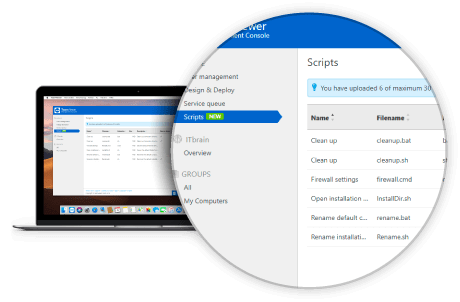
One-click Remote Script Execution
Use scripts to automate routine processes and save time on daily tasks
Upload your scripts to the Management Console for easy and convenient access during each session. Save time & money by automating repeatable processes.
Premium + Corporate
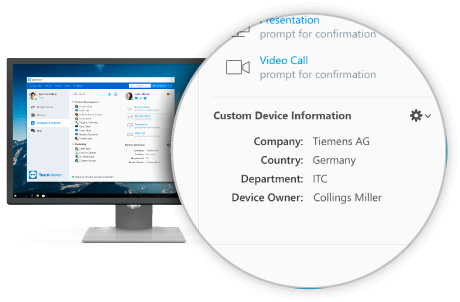
Custom Device Information
Add the information you need for your daily work onto devices in the Computers & Contacts list. Display details such as OS, manufacturer, department, or any preferences.
Focus on configuring company-critical areas in the Management Console so colleagues can input relevant information into the Computer & Contacts list.
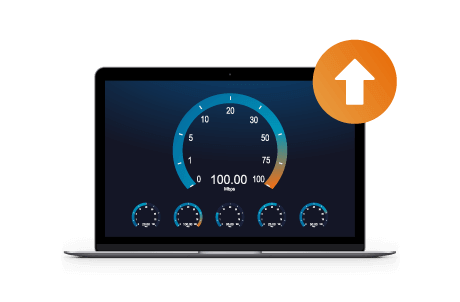
Increased Performance for Low Bandwidths
Approximately 1/5 TeamViewer sessions run on low bandwidth connections (<1 Mbit/s)
This new version improves speed and reliability for users operating on such connections, thanks to smart adaptive compression technology, which automatically detects low bandwidth and adjusts compression.
Enhanced Connection Quality
Experience better connection quality with significantly reduced latency. When starting TeamViewer, you will now connect to the nearest server rather than the main servers in Germany.
The developer has expanded network infrastructure worldwide to enhance performance while laying the foundation for future growth.
Premium + Corporate
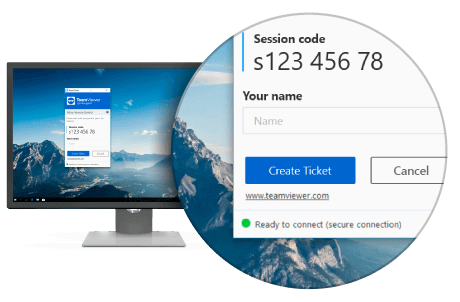
Servicecamp Integration in QuickSupport
Make your services more accessible to customers by allowing them to create a service camp ticket in the QuickSupport module, even when offline.
You can add custom fields to proactively gather details, ensuring the support team is well-prepared for the session.
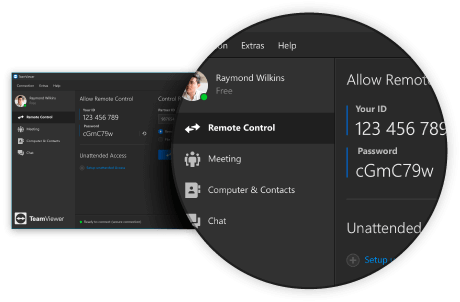
Dark Mode
Dark Mode lets you work the way you like. The dark interface is more eye-friendly, helping you focus, especially in low-light environments.
Easily switch between light and dark themes anytime on your PC.
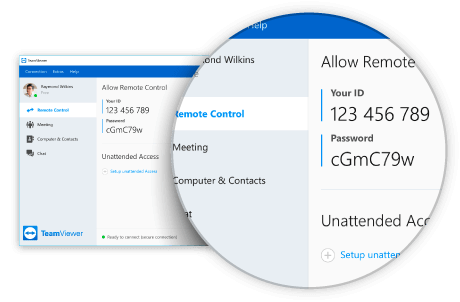
New Design
Enjoy a cleaner and more efficient TeamViewer experience
Improved color scheme offers a more intuitive design with simplified button links and significant layout changes. Discover a bright, fresh TeamViewer interface.
New iOS Screen Sharing Workflow
Enhance iOS screen sharing with a new extension. Once a session starts, users can receive help with a simple click .
Your connection partner just needs to hit the embedded button in the QuickSupport app dialogue to start sharing the screen immediately.
Trusted Device Management
Monitor trusted devices and IP addresses
Administrators can also view all trusted devices of the company and easily move them in emergencies for maximum security.
TeamViewer is often referred to as Teamview . Download the latest TeamViewer to experience superior features and technology in connecting, remote computer control .
Changes in the latest TeamViewer version

TeamViewer 15.69.4 – 15.69.5:
New Features
- Easily activate TeamViewer CoPilot and Session Insights with an admin account directly from the Remote Support page.
- Custom QuickSupport and Host modules are available for download in 64-bit version.
- TeamViewer MSI installer supports direct device assignment via parameters instead of requiring scripts.
- Upcoming event notifications enabled in Settings.
- Offline assignment for devices.
- Device details board includes a DEX Essentials view, showing aggregated data and 30-day automation execution history on the machine.
- Allows customization of DEX Essentials information on the device and disabling non-relevant data.
Improvements
- TeamViewer CoPilot button is always displayed on the remote session toolbar.
- AI Admin-Settings has moved to Organization Management.
- Enable contact and group assignment during new Host module configuration.
- Enable Session Insights individually for connections by activating devices for both AI and Quick Support module configuration.
- Turn on link-redirection vulnerability defense.