Download ImTOO FLV Converter 6.6.0.0623 – Phần mềm chuyển đổi video FLV
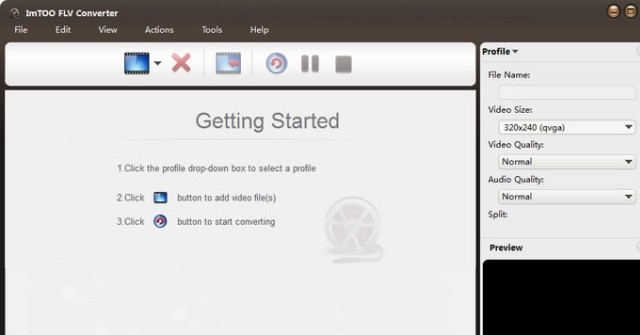
Download ImTOO FLV Converter 6.6.0.0623 – Phần mềm chuyển đổi video FLV

ImTOO FLV Converter là phần mềm chuyển đổi video FLV chuyên nghiệp sang các định dạng phổ biến như AVI, MP4, DivX. Phiên bản mới cập nhật của ImTOO FLV Converter có tốc độ chuyển đổi nhanh hơn nhiều lần với độ tin cậy và chính xác cao.

Ngoài ra, ImTOO FLV Converter cũng hỗ trợ chuyển đổi ngược từ AVI về FLV , MP4 sang FLV hay WMV sang FLV. Bên cạnh đó, công cụ này cũng có khả năng chuyển đổi cả file âm thanh như MP3 sang FLV và SWF như công cụ chuyển đổi audio thông thường.
Điểm mới trên ImTOO FLV Converter
- Tương thích với iOS 10, iPhone 7, 7 Plus.
- Tương thích với iOS 9, iPhone 6s, 6s Plus.
- Hỗ trợ iPhone 6, 6 Plus.
- Hỗ trợ iPhone 5, iPad Mini và iPad 4.
- Tối ưu hóa thông số profile với GPU.
- Hỗ trợ thông số profile Main, Baseline và High.
- Hỗ trợ thông số preset Ultrafast, Superfast, Veryfast, Faster, Fast, Medium, Slow, Slower.
- Sửa lỗi.
- Chuyển đổi nhiều video cùng lúc với tốc độ cao.
- Hỗ trợ metadata cho định dạng MP4 và M4A.
- Hỗ trợ mã hóa AMD APP.
- Có thể thay đổi kích thước trình phát video tích hợp.
- Chuyển chế độ zoom 4:3 và 16:9.
- Phân loại các thiết lập profile.
- Thêm chức năng quản lý file.
- Hỗ trợ giải mã CD.

Key Features of ImTOO FLV Converter
- ImTOO FLV Converter supports converting Flash FLV videos to various other formats for playback on mobile devices, including converting FLV to AVI, MPEG, MP4, 3GP, WMV, MOV, DivX, and XviD…
- Convert to FLV and flash video SWF formats, such as AVI to FLV or MPEG, WMV, DivX, MP4, MKV, H.264, RM, RMVB, MOV, XviD, 3GP, ASF, VOB, M4V to FLV.
- Easily upload FLV videos to YouTube and other video sharing sites, enjoy MP4 videos converted from FLV and play on iPod, PSP, iPhone, or WMV on Xbox.
- Convert audio files to flash video, such as MP3, MP2, WMA, M4A, AAC, AC3, OGG, APE, CUE and audio CD to FLV. CD decoding supported.
- Fast video format conversion speed when used with high-performance machines.
- Can convert multiple files simultaneously without affecting overall speed.
Other Features:
- Supports NVIDIA CUDA & AMD APP technologies to optimize FLV video conversion.
- Convert multiple videos simultaneously on threads with one click.
- Select individual parts within a file to convert by specifying start time and duration, split a file into multiple parts.
- For desired output file size, enter a specific value into Bitrate Calculator once.
- Output multiple files with identical or different profiles from one source to convert.
- Manually adjust video or audio file parameters such as bit rate, frame rate, sample rate, codec.
- Run ImTOO FLV Converter in the background during conversion to save resources.
- Automatically shut down the computer after completing the conversion process.
- Preview input files before conversion or during the process.
- Capture screenshots during preview and save as JPG, PNG, GIF, or BMP files.
- Powerful file management.
Loc Nguyen
Frequently Asked Questions
ImTOO FLV Converter is professional software for converting FLV videos to popular formats like AVI, MP4, DivX, and many others.
The software supports converting from FLV to formats like AVI, MPEG, MP4, 3GP, WMV, MOV, DivX, XviD, and vice versa from formats like AVI, MP4, WMV to FLV. It also allows converting audio files to FLV.
The new version supports compatibility with iOS 10, iPhone 7, 7 Plus, iOS 9, iPhone 6s, supports iPhone 6, 5, iPad Mini, optimizes parameters with GPU, supports many profiles and presets, fixes some bugs, allows converting multiple files simultaneously, supports MP4 and M4A metadata, supports AMD APP encoding, allows changing video player sizes, conversion zoom for 4:3 and 16:9, supports CD decoding, and more improvements.
Yes, the software can convert audio formats like MP3, MP2, WMA, M4A, AAC, AC3, OGG, APE, CUE, and audio CD to flash video format FLV.
Yes, ImTOO FLV Converter can convert multiple video files at once with high speed using threads.
The video conversion speed is fast, especially when used on high-performance machines; the new version is 5 times faster than the old one.
The software supports NVIDIA CUDA and AMD APP technologies to optimize the process of converting FLV videos.
The software has powerful file management capabilities, allowing splitting files, selecting parts to convert, previewing files, capturing screenshots, and automatic shutdown after conversion is completed.
Yes, users can manually adjust parameters like bit rate, frame rate, sample rate, codec for video or audio files.
The software is compatible with iOS 10 devices, iPhone 7, 7 Plus, iOS 9, iPhone 6s, 6s Plus, iPhone 6, 6 Plus, iPhone 5, iPad Mini, and iPad 4.