Download Hiren’s BootCD 15.2 / 1.0.2 – Hiren’s BootCD PE x64: Tạo Boot CD đa chức năng
Download Hiren’s BootCD 15.2 / 1.0.2 – Hiren’s BootCD PE x64: Tạo Boot CD đa chức năng

Hiren’s BootCD là một CD khởi động với các công cụ chẩn đoán như theo dõi phân vùng, đo hiệu năng hệ thống, sao chép đĩa và công cụ hình ảnh, khôi phục dữ liệu, công cụ MBR, BIOS và nhiều công cụ khác giúp sửa lỗi máy tính. Hiren’s BootCD PE có thể khởi động, hữu dụng ngay cả khi hệ điều hành chính không thể chạy.
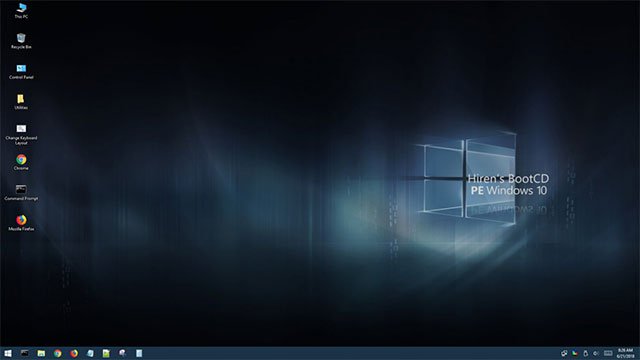
Ngoài Hiren’s BootCD quen thuộc, bạn có thể tải Hiren’s BootCD PE miễn phí và sử dụng cho máy tính hỗ trợ khởi động UEFI với RAM từ 2GB.
Hiren’s BootCD PE là phần mềm đĩa Boot CD đa năng, phục vụ như đĩa khởi động cứu hộ máy tính khẩn cấp trên nền Windows 10 PE x64.
Phiên bản Hiren’s BootCD PE mới nhất không có phần mềm lậu, hoàn toàn miễn phí và hợp pháp. Cài đặt trên máy tính Windows 10 PE 64-bit và chạy chương trình, nó sẽ tự động tìm và cài các driver quan trọng như card đồ họa, âm thanh, Wi-Fi và Ethernet Card. Từ đó, người dùng có thể kết nối mạng Wi-Fi hoặc Ethernet. Nhìn chung, Hiren’s BootCD PE là công cụ cứu hộ máy tính toàn diện và hiệu quả.
Hiren’s BootCD PE hỗ trợ khởi động UEFI từ DVD và USB, định dạng và phân vùng đĩa, sao chép nội dung ISO vào USB/DVD.
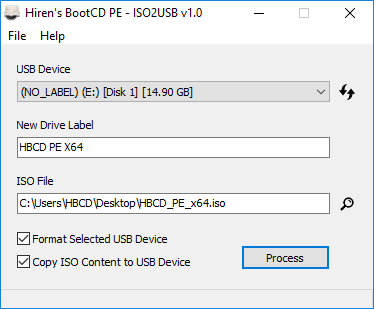
Sau một thời gian im ắng, nhà phát triển ra mắt Hiren’s BootCD PE (Preinstallation Environment) – phiên bản khôi phục từ Hiren’s BootCD trên nền Windows 10 PE x64. Thực tế không có bản cập nhật chính thức từ 11/2012, phiên bản PE phát triển hoàn toàn bởi người dùng Hiren’s BootCD. Nó bao gồm các công cụ mới nhất và tốt nhất từ Hiren Boot CD .
Cài đặt Hiren’s BootCD PE 64-bit để có đĩa khởi động đa năng, với các chương trình chẩn đoán như theo dõi phân vùng, đo hiệu năng, sao chép đĩa, ISO, phục hồi dữ liệu… để sửa lỗi máy tính. Là đĩa Boot CD nên Hiren’s BootCD PE cực kỳ hữu ích ngay cả khi hệ điều hành chính không thể khởi động.
Những chương trình trong Hiren’s BootCD
Công cụ chống virus
- Avira AntiVir Personal: chương trình quét virus và spyware mạnh mẽ, phát hiện và loại bỏ trên 5000 loại virus và trojan.
- ClamWin Free Antivirus : chương trình quét virus mã nguồn mở miễn phí.
- ComboFix: dọn sạch malware và khôi phục lại các thiết lập bị thay đổi bởi malware.
- Dr.Web CureIt! Antivirus: quét và chống virus, spyware miễn phí.
- GMER: quét các dịch vụ, registry, tập tin ẩn, phát hiện và xóa rootkit.
- Malwarebytes Anti-Malware: ứng dụng chống malware loại bỏ cả malware tiên tiến.
- Remove Fake Antivirus: công cụ loại bỏ virus/malware giả mạo chương trình chống virus, đưa ra cảnh báo/thông báo giả.
- RootkitRevealer: công cụ nhận biết rootkit tiên tiến đang phát triển.
- Spybot: Search & Destroy: ứng dụng quét spyware, adware, hijacker và phần mềm độc hại khác.
- SuperAntispyware: loại bỏ adware, malware, parasite, rootkit, spyware, trojan, worm.
- TDSSKiller: loại bỏ malware thuộc gia đình Rootkit.Win32.TDSS aka Tidserv, TDSServ và Alureon.
Công cụ sao lưu
- CloneDisk: công cụ toàn diện cho sao lưu MBR, Partition, Disk, VMWare Disk vmdk/vmx/vhd,…
- COPYR.DMA: công cụ tạo bản sao ổ cứng có bad sector.
- CopyWipe: sao chép ổ cứng cũ sang ổ mới, bảo mật thông tin qua việc xóa an toàn.
- DiskImage: tạo và ghi tập tin sao lưu ổ cứng vào đĩa.
- DriveImage XML: sao lưu mọi ổ cứng/phân vùng vào tập tin, thay thế cho Ghost/Acronis.
- Drive SnapShot: tạo bản sao lưu hệ thống vào tập tin.
- FastCopy: phần mềm sao chép/xóa nhanh nhất trên Windows.
- G4L Ghost 4 Linux: ghi và sao lưu ổ cứng/phân vùng như Norton Ghost.
- GImageX: ImageX sao lưu/khôi phục WIM cho Windows XP/Vista/7.
- Image For Dos: tạo bản sao lưu toàn bộ ổ cứng lên CD/DVD/BD boot lại được.
- Image For Windows: sao lưu và khôi phục ảnh chụp phân vùng ổ cứng, ghi trực tiếp ra DVD+RW+R-R-RW hay CD-R/RW.
- ImgBurn: ứng dụng ghi CD/DVD/HD DVD/Blu-ray, hỗ trợ BIN, CUE, DI, DVD, GI, IMG, ISO, MDS, NRG, PDI.
- InfraRecorder: phần mềm ghi CD/DVD mã nguồn mở, tạo và ghi bản sao .iso.
- Macrium Reflect: tạo bản sao lưu hoàn chỉnh cho phân vùng ổ cứng.
- ODIN: Open Disk Imager hỗ trợ sao lưu windows đang chạy.
- Partition Image: PartImage hỗ trợ các hệ thống tập tin Ext2, Ext3, Reiserfs, HFS, HPFS, JFS, Xfs, NTFS.
- Partition Saving: sao lưu và khôi phục phân vùng (SavePart.exe).
- RegBak: tạo bản sao lưu tập tin Windows registry.
- Raw Copy: truyền dữ liệu trực tiếp giữa hai ổ cứng.
- ShadowCopy: sao chép toàn bộ tập tin/hệ thống ngay cả khi bị khóa.
- SelfImage: tạo tập tin sao lưu bất kỳ phân vùng ổ đĩa.
- Seagate DiscWizard: sao lưu ổ cứng/phân vùng Seagate (quản lý bởi Acronis).
- TeraCopy: chương trình sao chép/di chuyển tập tin nhanh nhất có thể, có nhiều tính năng hỗ trợ.
- WhitSoft File Splitter: công cụ phân chia/ghép tập tin.
- XXClone: ghi ổ đĩa Windows sang ổ khác, tạo bản ghi tự động boot.
Công cụ BIOS/CMOS
- Award DMI Configuration Utility: công cụ thay đổi/xem nội dung DMI.
- !BIOS: công cụ dành cho BIOS và CMOS.
- BIOS Cracker: gỡ bỏ mật khẩu BIOS (cmospwd).
- BIOS Utility: thông tin, mật khẩu, mã beep BIOS,…
- CMOS: lưu trữ/khôi phục CMOS.
- DISKMAN4: công cụ toàn diện, mạnh mẽ.
- Kill CMOS: xóa CMOS.
- UniFlash: công cụ BIOS flash.
Bộ quản lý trình duyệt/tập tin
- 7-Zip: lưu trữ tập tin với tỉ lệ nén cao, hỗ trợ định dạng 7z, ARJ, BZIP2, CAB, CHM, CPIO, DEB, DMG, FAT, GZ, GZIP, HFS, IMA, IMG, ISO, LZH, LZMA, MBR, MSI, NSIS, NTFS, RAR, RPM, TAR, UDF, VHD, WIM, XAR, XZ, ZIP, Z.
- Bulk Rename Utility: đổi tên nhiều tập tin, thay đổi dấu thời gian và dữ liệu EXIF.
- Dos Navigator: quản lý tập tin Dos kiểu Norton Commander với nhiều tính năng.
- EasyUHA: công cụ GUI tạo và trích xuất lưu trữ UHA.
- Everything: tìm kiếm tập tin/thư mục siêu nhanh với ftp/http server.
- Explore2fs: công cụ GUI explorer truy cập hệ thống tập tin linux ext2 và ext3 dưới Windows.
- Ext2Explore: mở và sao chép bản sao hệ thống tập tin ext2/ext3/ext4.
- File Maven: quản lý tập tin Dos với truyền tải tập tin nhanh giữa hai máy.
- File Wizard: quản lý tập tin: kéo/thả, sao chép, di chuyển, xóa,…
- FastLynx : quản lý tập tin Dos với truyền tải tập tin giữa máy tính.
- HashMyFiles : tính toán hash MD5/SHA1/CRC32 của tập tin.
- Mini Windows Xp: Windows XP di động chạy từ ổ CD/USB/RAM để sửa chữa/khôi phục hệ điều hành không hoạt động. Hỗ trợ LAN và WLAN (không dây), thêm driver USB 3.0 và SATA/SCSI/SAS Storage, hỗ trợ Dynamic disk, layout bàn phím nhiều ngôn ngữ.
- Opera Web Browser: trình duyệt web nhanh, nhỏ gọn với đầy đủ tính năng và email client.
- SearchMyFiles: thay thế cho ‘Search For Files And Folders’ của Windows + Duplicates Search.
- Tor Browser: truy cập Internet ẩn danh, duyệt các trang https an toàn.
- Total Commander : quản lý tập tin như Windows Explorer, với trình duyệt tập tin bảng, FTP tích hợp,…
- Volkov Commander : quản lý tập tin Dos với hỗ trợ LongFileName/ntfs.
- WinMerge: công cụ so sánh thư mục và tập tin, hiển thị khác biệt trực quan.
Công cụ dọn dẹp
- All Users Temp Cleaner: xóa thư mục tạm, tập tin không cần thiết khỏi bộ cài đặt.
- ATF Cleaner: xóa toàn bộ thư mục tạm, bộ nhớ Java cache, bộ nhớ cache Opera/Mozilla,…
- CCleaner: công cụ miễn phí tối ưu hóa hệ thống và bảo vệ sự riêng tư.
- CleanUp!: xóa tập tin rác tích lũy lấp đầy ổ cứng.
- CloneSpy: dọn dẹp tập tin trùng lặp, có tùy chọn tạo hardlink.
- Data Shredder : xóa ổ đĩa/tập tin an toàn.
- Delete Doctor : xóa tập tin khó xóa.
- Duplicate File Finder: quét và xác định tập tin trùng lặp, so sánh dựa trên từng byte.
- McAfee Removal Tool: gỡ McAfee phiên bản 2005 – 2012.
- MyUninstaller: thay thế cho bảng điều khiển thêm/xóa tiêu chuẩn.
- Norton Removal Tool: gỡ cài đặt Norton AntiVirus, Norton Internet Security, Norton 360.
- PC Decrapifier: xóa phần mềm cài đặt sẵn trên máy.
- Print Flush: dọn dẹp ống mực in và xóa tập tin in rác.
- Revo Uninstaller: xóa tập tin và entry registry không cần thiết bị bỏ lại.
- SpaceSniffer: tìm kiếm khoảng trống bị mất trên ổ đĩa.
- WinDirStat: dọn dẹp và xem số liệu sử dụng ổ đĩa.
Driver thiết bị
- 3DP Chip: công cụ tìm kiếm và tải driver cho thiết bị.
- Device Doctor: quét phần cứng, kiểm tra cập nhật driver.
- Double Driver: sao lưu và khôi phục driver.
- PCI 32 Sniffer: cung cấp thông tin thiết bị giống như thiết bị chưa xác định.
- Remove Non Present Drivers: tự động gỡ thiết bị không hoạt động/không kết nối.
- Smart Driver Backup: sao lưu driver thiết bị Windows.
- UnknownDevices : tìm thiết bị chưa xác định trong Device Manager.
- USBDeview: xem/gỡ cài đặt thiết bị USB đã kết nối.
Bộ chỉnh sửa/xem
- Atlantis Word Processor: tiện ích xử lý văn bản hỗ trợ RTF, MS Word DOC và DOCX.
- HxD: Hex Editor kiểm tra và chỉnh sửa tập tin, bộ nhớ chính, bản sao ổ đĩa.
- IrfanView: công cụ xem và chỉnh sửa hình ảnh miễn phí.
- Notepad++: chỉnh sửa văn bản và mã nguồn.
- PhotoFiltre: chương trình chỉnh sửa hình ảnh (Mini Photoshop).
- Picture Viewer: trình xem hình ảnh cho dos.
- QuickView Pro: trình xem phim cho dos.
- Spread32: Mini Exel với các chức năng cơ bản của chương trình bảng tính.
- SumatraPDF: công cụ đọc PDF gọn nhẹ, mã nguồn mở.
Hệ thống tập tin
- AlternateStreamView: xem/sao chép/xóa NTFS Alternate Data Streams.
- EditBINI: chỉnh sửa boot.ini trên NTFS.
- Ext2fsd: driver hệ thống tập tin Linux ext2/ext3 đọc và ghi trong Minixp.
- FileDisk Mount Tool: gắn bản sao ISO/BIN/NRG/MDF/IMG.
- Filemon: hiển thị hoạt động hệ thống tập tin trong thời gian thực.
- ImDisk: tạo/gắn ổ đĩa ảo, đĩa mềm hoặc CD/DVD.
- Junction : tạo/xem/xóa cú pháp điểm trên NTFS.
- NewSID : thay đổi ID bảo vệ (SID) cho Windows NT, 2000 và XP.
- NTFS Access: thiết lập quyền hạn truy cập NTFS đầy đủ.
- NTFS Dos : truy cập chỉ đọc NTFS từ Dos.
- Angry IP Scanner : scans IP addresses within any range and port.
- Complete Internet Repair : a comprehensive tool to fix typical Internet connectivity issues and attempts to repair everything Internet-related on Windows.
- CurrPorts : displays the list of all currently opened TCP and UDP ports on your computer.
- Network Password Recovery : retrieves Network passwords on Windows XP/Vista/important files.
- PuTTY : an open-source terminal emulator that functions as a client for SSH and Telnet.
- SoftPerfect Network Scanner : multi-threaded IT, NetBIOS, and SNMP scanner with a modern interface and advanced features.
- SmartSniff : network monitoring tool that captures TCP/IP packets transferred through your network adapter.
- TCPView : lists TCP and UDP endpoints, including local/remote addresses of TCP connections.
- TFtpd32 : used for Trivial File Transfer Protocol (TFTP) client with DHCP, TFTP, SNTP, and Syslog servers; can also be used for PXE boot.
- WinSCP : a free/open-source SFTP/FTP client to securely transfer files between local and remote computers.
- WifiInfoView : provides wireless network information including SSID, MAC address, PHY Type (802.11 g or 802.11 n), RSSI, signal quality, frequency, channel number, maximum speed, company name, router name/model, etc.
- WirelessNetView : monitors the activity of wireless networks around you.
- XP TCP/IP Repair: fixes Windows XP Winsock and TCP/IP registry errors.
- Defraggler: defragment your entire hard drive or individual files.
- MyDefrag: a free disk optimization and defragmentation tool (formerly JkDefrag) for Windows 2000/2003/XP/Vista/Windows 7.
- NT Registry Optimizer: a registry optimization tool for Windows NT/2000/2003/XP/Vista.
- PageDfrg: a system file defragmentation tool for NT/2k/XP.
- Calcute: compact scientific tape calculator with multiple features.
- Don’t Sleep: temporarily stop power management and prevent system shutdown, standby, hibernate, turn off, and restart.
- Fix ‘NTLDR is missing’: resolve ‘NTLDR is missing, Press any key to restart’ issue for Windows XP.
- HBCD Customizer: HBCDCustomizer.exe is a GUI tool to create custom ISO images of Hiren’s BootCD.
- HBCD Program Launcher : Hiren’s BootCD program launcher (HBCDMenu.exe and HBCDMenu.csv) can be used to launch all programs from USB/CD.
- Mouse Emulator: use the numeric keypad as a mouse, useful when your mouse breaks or for USB driver issues.
- NT 6.x fast installer: install Windows Vista/7 directly to a hard drive/USB.
- On-Screen Keyboard: displays a virtual keyboard on the computer screen, allowing people with disabilities to type using pointing devices or a joystick.
- Parted Magic: Linux-based recovery environment with tools for partition management, backup, and recovery, such as GParted, Parted, Partition Image, TestDisk, Clonezilla, GSmartControl, etc., supports file systems like btrfs, ext2, ext3, ext4, fat16, fat32, hfs, ntfs, reiserfs, and xfs.
- Universal TCP/IP Network 6.5: MSDOS Network Client to connect via TCP/IP to Microsoft network systems. It includes 98 different network card drivers.
- WinNTSetup: install Windows 2k/XP/2003/Vista/7/8 x86/x64 from USB/CD inside PE/LiveXP, allowing you to customize and choose drive letter for new Windows installation.
- eXtended Fdisk: enables easy creation and management of partitions.
- Fat32 Formatter GUI: Windows XP cannot format drives larger than 32 GB with FAT32.
- GParted Partition Editor: create, copy, paste, delete, hide, resize, or move partitions without data loss, a powerful freeware replacement for Partition Magic.
- Mount Drives: Auto Mount Drives can be used to mount/unhide drives.
- Partition Table Editor: includes Partition Table and Boot Record Editor.
- Partition Wizard Home Edition: free replacement for Partition Magic with functionalities like resize/move/copy/create/delete/format/convert/partition exploration, etc.
- Ranish Partition Manager: boot and partition manager tool.
- Smart Fdisk: simple hard drive partition manager.
- SPecial Fdisk: SPFDISK is a partition tool.
- Super Fdisk: create, delete, format partitions without damaging data.
- The Partition Resizer: move and resize your partitions with a single step.
- USB Format Tool: format/create any bootable USB flash drive for FAT, FAT32, or NTFS partitions.
- Volume Serial Number Changer: allows you to change the serial number of your drive on FAT, FAT32, and NTFS file systems.
- ATAPWD: hard drive password tool.
- Autologon: allows you to easily configure Windows built-in autologon tool, skipping the login screen.
- BIOS Master Password Generator: collection of password generators to reset BIOS Power or admin passwords on various brands like Acer, Compaq, Dell, Fujitsu Siemens, Sony, etc.
- BulletsPassView: recover passwords stored behind asterisks in Windows/IE.
- ClearLock: locks your screen with a transparent layer, allowing you to view your screen while denying access without the correct password.
- Content Advisor Password Remover: remove Content Advisor password from Internet Explorer.
- Dialupass: retrieves DialUp/RAS/VPN usernames, passwords, and domains.
- Kon-Boot: bypass Windows logon password (32-bit) and Linux like kon-usr.
- LicenseCrawler: find license keys and serial numbers for your programs.
- Mail PassView: recover mail passwords of Outlook Express, MS Outlook, IncrediMail, Eudora, etc.
- MessenPass: recover passwords for various instant messaging apps.
- NTPWD: tool for resetting admin/user password on Windows NT/2000/XP.
- NTPWEdit: a password editor for Windows NT-based systems to change or remove passwords for local system accounts.
- Offline NT Password Changer: tool to reset/unlock admin/user password on Windows NT/2000/XP/Vista/7.
- Password Renew: tool to set/reset Windows NT/2000/XP/Vista/7 passwords (32-bit only).
- ProduKey: recover your lost Windows/Office product keys.
- PST (Outlook) Password Recovery: PstPassword is a small utility to recover lost password of Outlook .PST (Personal Folders) file.
- Router IP/Passwords: full list of default router passwords and IPs, useful if router manual or passwords are lost.
- SniffPass: password monitoring tool that captures passwords passing through your network adapter, working on POP3, IMAP4, SMTP, FTP, and HTTP protocols to recover lost Web/FTP/Email passwords.
- WebBrowserPassView: view the stored logins and passwords by web browsers like Mozilla Firefox, Opera, Safari, Google Chrome, and Internet Explorer.
- WindowsGate: enable/disable Windows logon password authentication.
- Windows Product Key Update Tool: designed by Microsoft to change illegal/pirated XP key installed.
- WirelessKeyView: recover all wireless network keys (WEP/WPA) stored in your computer by WZC Wireless Zero Configuration.
- XP Key Reader: decrypts XP key on local/remote systems.
- Dependency Walker: checks for missing or invalid DLL/modules/functions for exe/dll/ocx/sys.
- IB Process Manager: compact process manager for 9x/2k, shows dll info, etc.
- OpenedFilesView: view opened/locked files in your system, sharing violation issues.
- Pocket KillBox: used to remove stubborn files.
- Process Explorer: shows information about which handles and DLLs processes have opened or loaded.
- Process Monitor: monitors file system, Registry, and process/thread activity in real-time, a replacement for Filemon and Regmon.
- ProcessActivityView: detailed process access info, read/write/opened files, etc.
- RKill: kills malware processes, imports Registry files that remove incorrect file associations, and fixes policies that prevent certain tools from being used.
- RunAsDate: allows you to run programs on a specific date and time.
- Unlocker: allows you to delete files/folders when you get messages: Cannot delete file: Access is denied, file in use by another program, etc.
- DataRescue DD: DrDD is a disk backup tool used to recover and back up data from partially defective storage devices with main benefits like Range Selection and Copy Backward Direction.
- DiskDigger: retrieves lost images, videos, music, documents, and other formats from your hard drive, memory cards, and USB flash drives.
- DiskGenius: recover deleted partitions, rebuild MBR, rebuild partition tables, recover files, and more.
- IsoBuster: CD/DVD/Blu-ray data recovery tool and disk backup utility for reading and extracting files, tracks, and items from CD-i, VCD, SVCD, CD-ROM, DVD, BD, and HD DVD as well as other devices, includes retry mechanism for damaged CDs/DVDs.
- Partition Find and Mount: software to locate deleted or lost partitions.
- PartitionRecovery: freeware to recover accidentally deleted partitions.
- PhotoRec: tool for recovering files and images for Dos/Windows/Linux.
- Recuva: recovers deleted files from hard drives, USB drives, camera memory cards, and more.
- Restoration: tool to recover accidentally deleted files.
- ShadowExplorer: allows you to browse shadow copies created by Windows Volume Shadow Copy Service and restore older versions of files that you have accidentally deleted or changed.
- Smart Partition Recovery: finds and restores lost NTFS partitions.
- SoftPerfect File Recovery: retrieves accidentally deleted files from hard drives, USB flash drives, CF cards, and SD cards.
- TestDisk: tool for checking and recovering partitions from Dos/Windows/Linux.
- TrID File Identifier: tool to recover file type from the content, replacing UnChk and FileChk.
- Unstoppable Copier: allows copying files from troubled drives such as bad sectors, scratches, or errors reading data.
- ERUNT: ” Emergency Recovery Utility NT Registry Backup and Restore ” is a backup and restore utility for Windows NT/2000/2003/XP.
- Fix HDC: fix Hard Drive Controller after motherboard change on XP systems.
- Glary Registry Repair: advanced registry cleaner to safely clean and repair registry issues.
- RegFromApp: monitors/exports Registry changes made by selected applications.
- Registry Editor PE: easily edit registry hives and user profiles remotely.
- Registry Restore Wizard: recovers corrupted system registries from XP System Restore.
- Regmon: monitoring tool showing applications accessing your registry.
- RegScanner: tool to search in Windows Registry.
- RegShot: a registry compare utility that allows you to quickly take a snapshot of your registry and then compare it with a second, new one: done after system changes or product installations.
- Registry Viewer: Registry viewer/editor for Win9x/Me/NT/2K/XP.
- TeamViewer: access any remote computer through Internet as if sitting right in front of it, even through firewalls; includes version 6.0.10462 for MiniXP.
- TightVNC: Remote Desktop Software for viewing/controlling remote computers using the mouse and keyboard.
- DiskCryptor: high-speed disk encryption tool for encrypting entire disks/partitions with system partition encryption support.
- EncFS: used to protect online file backup services like Google Drive, Dropbox, and Sugarsync without fixed encryption and accessed via BoxCryptor/Cryptonite on Linux, iPhone/iOS, and Android.
- FreeOTFE: an open-source, free, transparent disk encryption program.
- TrueCrypt: Linux/Windows disk encryption tool that creates an encrypted virtual disk in a file and mounts it like a real disk; can also encrypt entire HDD/partitions/USBs.
- Autoruns: displays all entries from startup folders, Run, RunOnce, and other registry keys, Explorer extensions, toolbars, browser helper objects, Winlogon notifications, autostart services, Scheduled Tasks, Winsock, LSA Providers, Remove Drivers, etc., helpful for removing spyware/adware and virus.
- HijackThis: tool to detect and remove hijackers.
- ServiWin: Windows Services/Drivers alternative tool.
- Silent Runners Revision 64: free script that detects spyware, malware, and adware during startup.
- Startup Control Panel: tool to edit startup programs.
- Startup Monitor: notifies you whenever a program registers itself to run at system startup.
- Astra: provides system information and reporting tools.
- BattStat: freeware to monitor battery status and power management for Windows x86/x64.
- BlueScreenView: scans minidump files for BSOD (Blue Screen of Death) information.
- BrowsingHistoryView: see browsing history data from web browsers like Internet Explorer, Mozilla Firefox, Google Chrome, and Safari in one table.