Download DaVinci Resolve 19 19.0 – Ứng dụng chỉnh sửa video chuyên nghiệp
Download DaVinci Resolve 19 19.0 – Ứng dụng chỉnh sửa video chuyên nghiệp

DaVinci Resolve 19 là ứng dụng giúp người dùng chỉnh sửa và cải thiện các video để hình thức của chúng trông chuyên nghiệp hơn. DaVinci Resolve mới nhất bao gồm nhiều tính năng chỉnh sửa video mạnh mẽ và toàn diện.
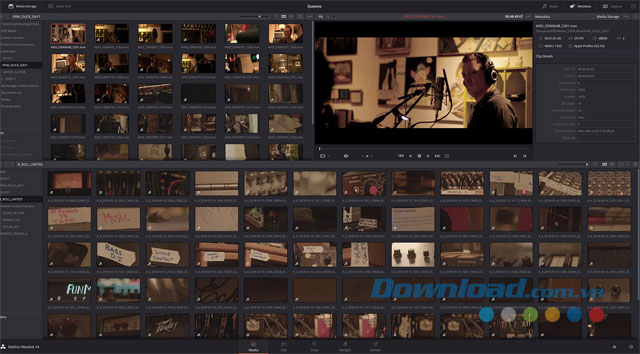 Giao diện chính của phần mềm chỉnh sửa video DaVinci Resolve cho máy tính
DaVinci Resolve là một ứng dụng chỉnh sửa video bao gồm đầy đủ các tính năng tuyệt vời, cung cấp cho người dùng hàng loạt các công cụ chuyên môn và môi trường thích hợp để phục vụ cho các mục đích chỉnh màu và chỉnh sửa video theo ý muốn.
Có gì mới trong DaVinci Resolve 19?
DaVinci Resolve 19 giới thiệu hàng loạt công cụ DaVinci Neural Engine AI mới và mạnh mẽ, tận dụng sức mạnh từ công nghệ trí tuệ nhân tạo, cùng với hơn 100 nâng cấp tính năng nhỏ khác.
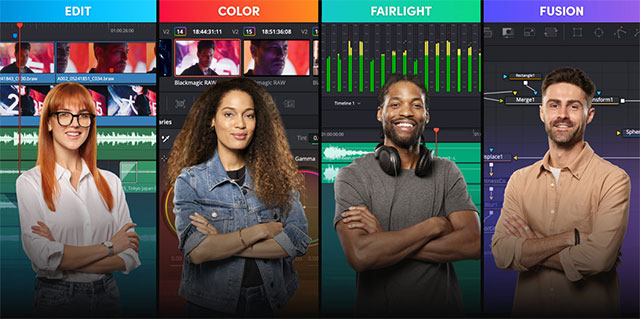
Giờ đây, người dùng có thể làm việc trực tiếp trên phần âm thanh đã được phiên âm để tách riêng phần lời nói và chỉnh sửa timeline dễ dàng. Tạo ra những thước phim đầy màu sắc và rực rỡ sống động nhờ bảng màu vector ColorSlice 6 cấp độ, giúp tạo ra những bức ảnh đậm chất điện ảnh thông qua hiệu ứng màu phim – mô phỏng từ quy trình làm ảnh phim truyền thống.
Trong Fairlight, IntelliTrack AI được dùng để theo dõi chuyển động track và tự động xử lý âm thanh. Tính năng Fusion được mở rộng với bộ công cụ đáng giá, đặc biệt nhất là công cụ Multipoly Rotoscope. Tính năng cắt cũng được trang bị thêm công cụ phát lại để chỉnh sửa video đa camera trực tiếp, phát và phát lại với tốc độ tùy ý.
Tính năng chính của ứng dụng DaVinci Resolve
- Chỉnh sửa sáng tạo
- Cắt xén nâng cao
- Chỉnh sửa nhiều camera
- Nhiều hiệu ứng tốc độ
- Chỉnh sửa đường cong dòng thời gian
- Hiệu ứng và kiểu chuyển cảnh đẹp mắt
- Hoàn thiện tác phẩm nhanh chóng
- Chất lượng màu cao
- Thỏa sức chỉnh màu
- Hỗ trợ cho dải tương phản động mở rộng (HDR)
- Hỗ trợ nhiều định dạng
- Tạo lên đến 1.000 bản nhạc
- Sử dụng bộ cân bằng và tùy chỉnh cường độ âm nhạc
- Chỉnh sửa và tự động hóa
- Mix nhạc
- Sử dụng các hiệu ứng bổ trợ
- Tùy biến âm nhạc để đạt chất lượng cao nhất
- Nhập các đoạn phim theo ý muốn
- Sắp xếp các clip
- Hỗ trợ cho siêu dữ liệu
- Nhiều tùy chọn truyền tải
- Kết xuất theo thứ tự
- Hỗ trợ nhiều loại tập tin, định dạng và các ứng dụng khác
- Khóa dòng thời gian và clip
- Tích hợp với tính năng chat
- So sánh dòng thời gian
- Hệ thống lưu trữ mở
Giao diện trông hiện đại và gọn gàng
Sau khi cài đặt, người dùng sẽ nhìn thấy một cửa sổ chính có phông nền màu đen giúp nhanh chóng sử dụng các tính năng tuyệt vời của ứng dụng. Giao diện này được phân chia thành nhiều phần khác nhau giúp tải tập tin đa phương tiện, chỉnh sửa, chỉnh màu và sử dụng tính năng tuyệt vời khác.
Dù phần mềm video DaVinci Resolve có số lượng tính năng dồi dào nhưng lại có giao diện hoàn toàn trái ngược. Vì cửa sổ chính trông đơn giản nên không có gì bất ngờ khi người dùng sẽ sử dụng hầu hết các tính năng của ứng dụng DaVinci Resolve từ thanh trình đơn DaVinci Resolve.
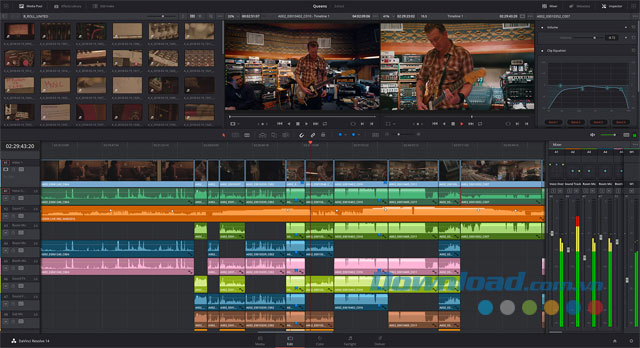
Edit videos with ease using DaVinci Resolve’s features
Utilize an array of fantastic features in user-friendly menus
Users can easily see that DaVinci Resolve is a video editing application with a full set of features by right-clicking on any loaded media file. Both the context menu and the regular menu are not larger than the application’s main window.
It can be observed that most aspects of post-production processing are supported by DaVinci Resolve. In fact, this video editing tool can be considered a professional, all-in-one solution for editors and colorists. Thus, users can easily work with layers, nodes, effects, mixers, and even plugins to create complex appearances.
Edit videos, color grade, and collaborate with colleagues
It’s worth noting that DaVinci Resolve, a professional video editing software, comes with a powerful Color Match feature allowing users to set source, adjust gamma, and color spaces. The software also supports image stabilization, 3D tracking, reshaping, RGB mixing, and customizing HSL color curves. These are just a few supported features of this software.
With multiple layers and mixed format Timeline features, DaVinci Resolve allows both video editors and colorists to work on the same file. Users can also create complex video transitions while still editing and mixing audio files.
A powerful application for completing post-production edits on videos and films
After reviewing all aspects, it’s clear that DaVinci Resolve is a powerful software that allows professionals in the film industry to elevate their work. The most impressive thing about this application is not just the number of features, handling many files, or sharing projects, but integrating all those elements seamlessly with various management tools without becoming complex or cumbersome to use. You can download DaVinci Resolve to start editing videos as desired now.
Note : Users need to fill out some basic information or click the Download Only button to download DaVinci Resolve.
Minimum system requirements for computers
- It’s recommended to have 16 GB of system memory, but the application also supports 8 GB or more
- Blackmagic Desktop Video version 10.4.1 or later
- NVIDIA/AMD/Intel GPU driver version as required by the GPU
- RED Rocket-X Driver 2.1.31.0 and Firmware 1.4.1.16 or later
- RED Rocket Driver 2.1.23.0 and Firmware 1.1.18.0 or later
Frequently Asked Questions
DaVinci Resolve 19 is an application that helps users edit and enhance videos to look more professional, including a wide array of powerful and comprehensive video editing features.
DaVinci Resolve 19 introduces the new and powerful DaVinci Neural Engine AI, over 100 minor feature upgrades, enabling direct work on transcription audio, 6-level ColorSlice vector palette, IntelliTrack AI in Fairlight, Multipoly Rotoscope tool in Fusion, and many improvements for multi-camera video editing.
DaVinci Resolve’s main features include creative editing, advanced cutting, multi-camera editing, speed effects, transition effects, high-quality color grading, HDR support, multiple format support, audio mixing and automation, import and organize clips, metadata support, and many other features.
DaVinci Resolve’s interface appears modern, sleek with a black background, and divided into different sections to easily handle media files, edit, color grade, and use other features.
Users can download DaVinci Resolve from the official site, requiring basic information filling or clicking the Download Only button to download the software.
Requirements include: a minimum of 8 GB of system memory (recommended 16 GB), Blackmagic Desktop Video version 10.4.1 or later, matching GPU driver for NVIDIA/AMD/Intel, and appropriate driver and firmware versions for RED Rocket-X and RED Rocket.
The software supports numerous file formats, multi-camera editing, color grading with vector palettes, audio editing support, the use of plugins, creating transition effects, and a variety of file exporting options.